
Instagram Shopping is no longer just a useful add-on — in 2026, it is a full-funnel sales channel where over 130 million users tap on shopping content every single day. With 3 billion monthly active users and Meta's AI now pushing shoppable Reels to buyers who have never even heard of your brand, there has never been a better time to master product tagging on Instagram.
This guide covers everything you need: how to set up your Instagram Shop, how to tag products in posts, Reels, Stories, and Live videos, and the latest 2026 tactics — from AI-powered recommendations to Live Shopping and creator commissions — to turn your Instagram presence into a consistent revenue stream.
Instagram Shopping is now a full-funnel sales channel — not just a feature, that allows you to mention any of your products in your content so that users can directly purchase it without leaving the platform. When brands tag their product in an image that they post anywhere on their Instagram account, then the user can get detailed information about that product just by clicking on it. They will find the complete pricing information along with the description of the product they clicked on.
They will have the complete freedom to purchase the spot without leaving the platform or switching any tab. They would be able to complete the whole purchasing procedure simply by being their business website that is connected to their Instagram account via the Instagram shopping feature.
Before you can tag products, you need an approved Instagram Shop. Here is the updated setup process for 2026:
1. Switch to a Business or Creator account in Instagram Settings.
2. Connect a Facebook Business Page to your Instagram account.
3. Create a Product Catalog in Meta Commerce Manager, or sync one automatically via Shopify, BigCommerce, or WooCommerce.
4. Link your Instagram account to the catalog inside Commerce Manager.
5. Submit your account for Instagram Shopping review (this typically takes 1–3 business days).
6. Once approved, go to Settings > Business > Shopping and enable Shopping on your profile.
7. Set up Collections in your Shop tab to organise products by category, season, or promotion.
⚠️ UK Users — Checkout Note
In-app Instagram Checkout (Meta Pay) is currently available in the US and a small number of test markets only. UK brands should set up website checkout — directing users to their own product pages for payment. Meta has announced an expected UK and EU expansion in 2026.
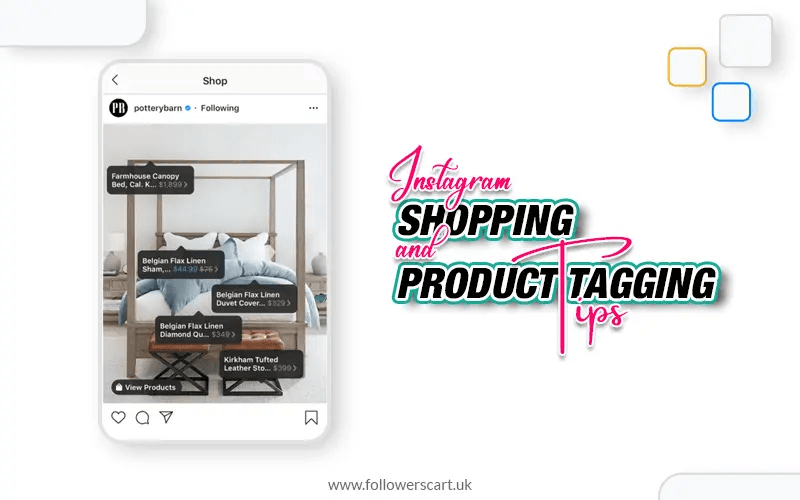
Product tagging lets you link any item directly inside a post, Reel, Story, or Live video. When a user taps the tag, they see the product name, price, variants and a direct link to your product detail page (PDP) — without leaving Instagram.
• Business accounts with an approved Instagram Shop
• Creator accounts (with a connected catalog)
• Influencers and partners — they can tag your products in their own posts (affiliate commissions now available via Meta's March 2026 creator program)
• Regular users — can tag products to flag them, but do not receive commissions unless an affiliate agreement exists
• Single-image posts: up to 5 product tags
• Carousel posts: up to 20 product tags across all slides
• Stories: use the Product Sticker (one sticker per Story frame)
• Reels: tag appears in the bottom-left corner, linked to the full product tray
• Live Shopping: pre-load up to 30 products before going live; pin individual products during the broadcast
This is also a very important question that highlights the importance of Instagram tagging products on Instagram and doing all the effort related to it. why is it so important for brands to tag a product in the first place? Let’s explore some main reasons that make brands do so:
Most of the customers feel so annoyed when they have to switch several tabs while making a purchase and many of them end up in the process as they feel it is so time-consuming. With the Instagram tag feature, customers can easily discover a product and then he or they may quickly get into the buying process in just a few clicks without changing any tab or going anywhere else. This not only shortens the purchasing process for your clients but also reduces the risk of losing your valuable customers.
When you offer such an organized and concise buying process to your clients using Instagram tag it gives a positive impact on the overall image of your brand. this makes more and more people come to your account and make purchases. This looks so professional and leaves very small room for second thoughts. Hence, it helps increase the rate of your conversions to a great extent.
Product tagging allows you to undergo a smooth and seamless purchasing process as it also aims to enhance the overall shopping experience. This reflects so many positive impacts on your brand and also clears the path for repeat purchasing by making every client a permanent client. The loyalty of your brand is greatly increased by it.
The process of adding products on Instagram is so simple. The first thing you must learn is how to set up an Instagram shop. Once you have successfully arranged the setup of your online store on Instagram then you can easily tag your products by using the methods given below:
Tap on the plus icon located in the middle of your screen to create a new post.
You have to follow the same process as you do while creating a post on Instagram. First, you choose a photo or video from your gallery which you want to upload, then you add the necessary captions and filters which you feel are appropriate for your post. Then tap on the “next” button.
You will be able to see the option “Instagram tag product” just click on it
Tap on the place where the product is located in the image or video you are going to upload
You the search box to find the product you want to tag in the picture you are going to upload.
Click on “done” and then simply “share”
Now you have successfully created a shoppable post on your Instagram from where people can directly make purchases from your business website.
If you want to tag your products in your story content then you have to follow the given steps which will be very helpful for you in understanding how to add the product on Instagram.
Reels are now the primary driver of organic discovery on Instagram. The algorithm actively pushes shoppable Reels into Explore, the Reels feed, and in-feed recommendations — giving brands reach far beyond their existing followers.
• Tag products in every relevant Reel to trigger the shopping bag icon.
• Hook viewers in the first 3 seconds — show the product being used before anything else.
• Keep Reels between 15–60 seconds for maximum completion and reach.
• Use trending or niche audio to increase discoverability.
• Include a caption CTA: "Tap the bag icon to shop" or "Available in the link in bio."
According to 2026 platform data, 79% of users have purchased from an Instagram Shop after watching a Reel of the product — making this the single most effective content format for Instagram commerce.
Having an affiliate set up or collaborating with an influencer helps you tag your products in the content creator’s post. But you have to enable this setup fastest only then it could be implemented on your account. Just go to the setting tab on your profile and go to the profile setting which is located under the “shopping ads” tab. Then you would have to choose the creator whom you want to approve the product tagging. This will allow that creator to collaborate with you and hence they will be able to tag your product in their content.
Once you allow them by collaborating this way, you will be able to see the product tags of your brand in each of their posts and you can easily track the performance in this way. You will also be allowed to see the deep insight as post impressions and click etc. as it helps you analyze and evaluate if that influencer is enhancing your conversion or not.
Product tagging is the most advantageous feature but it doesn’t mean that it automatically starts generating sales for your brand. It only helps you display your product in the best possible way and enhance your customer experience but the rest of the hard work you would have to do on your own.
If you want to be successful you have to be very consistent with all of your Instagram marketing strategies. You have to create compelling content and make sure you religiously follow the consistency in your posting schedule and use the product tagging feature regularly in your content. this enhances the visibility of your shopping ads posts and it starts displaying to a wider audience.
As you want to limit the whole purchasing process to your Instagram shopping feature then you should be more focused while adding the details about the product. Your product should be displayed with all the important details that are important for your clients to know. If you want to ease the purchasing process for your shoppers you should describe every single aspect of your product. This may include the price, material, quantity, pros, and features of your product.
You should mention the authentic features of your products and avoid over-promising while talking about the quality of your product. Tell them what exactly you have in your product as this will enhance their overall experience of Instagram shopping.
As you do all this effort just to provide your customer with a seamless user experience so you would never want your customer encounter hanging when they click on the product tag of your brand. So, it is very important to keep a proper check on the working of your product tags. Make sure all the tags you applied for work seamlessly and none of them gives any error because this is not going to leave a going impression on the reputation of your brand.
This is why double-checking the performance of your tags is extremely important. You can better check their performance by using another account to see if they are working properly or not.
UGC is the social proof of the sustainability and good quality of your product originally by the people who have used it. it tells your new clients how the product looks in the real life and also the methods to use it. It helps you get so many more clients as the testimonial of your existing clients helps them make the buying decision of that product from you. due to this reason, there is a separate area on the Instagram shop which is dedicated to the reviews and opinions of your customers.
You can also tag your product on Instagram where your clients have posted photos of your products while using them as it helps you build trust as a brand among your clients. It is the best way to show appreciation for your customers for your products or services.
Meta is rapidly expanding AI across Instagram's commerce surfaces. In March 2026, Meta announced at Shoptalk that it is testing a new experience showing product summaries and AI-generated review highlights to users who tap on ads or browse shops.
• "For You"-style product feeds: Instagram now surfaces relevant products to users who haven't followed your brand — based on their browsing behaviour, interactions, and Meta AI signals.
• Clean catalog = better AI results: Detailed product titles, rich descriptions, accurate pricing, strong imagery, and consistent inventory signals all feed the AI recommendation engine.
• Higher engagement = more AI exposure: The more users click, add-to-cart, or complete purchases from your tags, the more the algorithm promotes your products.
• Reels creators in 22 countries now have access to product catalogs from businesses to feature in videos, per Meta's 2026 rollout — a major creator commerce expansion.
Displaying your products on Instagram by using the Instagram shopping feature is one of the best decisions you ever made for the growth of your brand. it may not help you get so many clients instantly but it will give you the benefits that you were totally beyond your imagination.
Product tags link directly to items in your Instagram Shop. Tap a tag on any post, Reel, or Story to see the product name, price, variants, and a link to purchase — without leaving Instagram.
Yes. Once your Instagram Shop is approved, you can tag products in any Reel. A shopping bag icon appears in the bottom-left corner; users tap it to browse a product tray and complete their purchase.
Yes. Instagram Shopping with website checkout is fully available in the UK. In-app Meta Checkout (paying inside Instagram) is currently US-only, with UK and EU expansion expected in 2026.
Up to 5 products on a single-image post, up to 20 across a carousel, one Product Sticker per Story frame, and up to 30 pre-loaded products in an Instagram Live broadcast.
You can use product tags that link to a DM conversation if you do not have a website. However, for UK businesses, a website checkout is the standard setup — and it gives you better analytics, SEO benefits, and repeat-customer capabilities.

Emma Brown
Social Media Growth Strategist
Emma Brown is a social media growth strategist specializing in Instagram marketing for UK creators and small businesses. With 5+ years of experience, she focuses on organic growth, engagement, and audience building. She shares practical insights on Instagram algorithms and content strategy to boost visibility and conversions. She holds a degree in Digital Marketing from the University of Manchester.
Loading related articles...
Related Articles